


About This Guide
Most of the Best HubSpot websites articles are based on an individual’s opinion that recommends HubSpot CMS as their only option. This guide is different.
As a Gold partner of HubSpot CMS and a Premium partner of Webflow, Belt Creative has a unique position. Through our HubSpot resources hub and hands-on implementation work we will provide honest answers about which platform would be the best fit for your needs. In this guide, we organize 8 recommended HubSpot websites by the capabilities they showcase: marketing automation depth, Smart Content personalization, and custom design within HubSpot's module constraints. Each site was evaluated according to a five-point evaluation system of HubSpot CMS. We also named two sites that outgrew HubSpot and migrated. We will examine the patterns behind and present the HubSpot vs. Webflow comparison and decision-making process that Belt uses with clients.
Top HubSpot Website Showcases for 2026
An Analysis of 8 Sites by CMS Functionality and the HubSpot vs. Webflow Verdict
Guide Overview
While most "best of" HubSpot lists rely on subjective preferences for the platform, this guide takes a more objective approach.
Belt Creative holds a unique perspective as both a HubSpot CMS Gold partner and a Webflow Premium partner. By using our HubSpot resources hub and direct project experience, honest answers about which platform fits your goals.
We picked 8 HubSpot sites and grouped them by what each one does best: deep marketing automation, Smart Content-driven personalization, and sophisticated custom design. Furthermore, we applied a proprietary five-point framework to evaluate these builds and included case studies of organizations that migrated after outgrowing HubSpot. To assist in your selection process, we also detail the HubSpot vs. Webflow comparison and the exact decision framework our team utilizes.
Whether you are launching a new project, considering a migration, or interested in a hybrid approach, the following first-hand guidance will help you determine if HubSpot CMS is the right choice for your business.
Our 5-Point Evaluation Framework for HubSpot Builds
Standard B2B website reviews typically focus on performance, conversion strategy, and aesthetics. While these remain critical, evaluating a HubSpot site requires looking deeper into how effectively it leverages the platform's internal tools.
This article will provide you with information that helps you determine if HubSpot CMS is suitable for your company's next project. If you are thinking about migrating your current web application to either HubSpot CMS or Webflow, or even if you want to implement both, then read on because you will find first-hand guidance.
How to Evaluate a HubSpot Website: The 5-Point Framework We Use With Every Client
A generic "best B2B website" list rates sites on aesthetics, conversion design, and performance. These factors do matter when looking at a HubSpot website. However, there is another level of evaluation: how well does it actually use the platform's native capabilities?
Why HubSpot Websites Need to Be Evaluated Differently
For example, an attractive HubSpot site may have ignored all of the Smart Content, native CRM integrations, and native modules that HubSpot offers. This means the developer wasted potential of the platform. On the other hand, a less polished HubSpot site that takes advantage of these exact features can be considered a much stronger technical implementation.
This is why Belt Creative evaluates HubSpot sites differently than Webflow sites. Different platforms reward different design choices. A site that earns a 10 on HubSpot might score a 7 on a general design rubric. A site that scores a 10 on a general design rubric might be doing almost nothing interesting with HubSpot under the hood. Knowing the difference requires platform fluency, not just aesthetic judgment.
The 5-Point HubSpot Framework
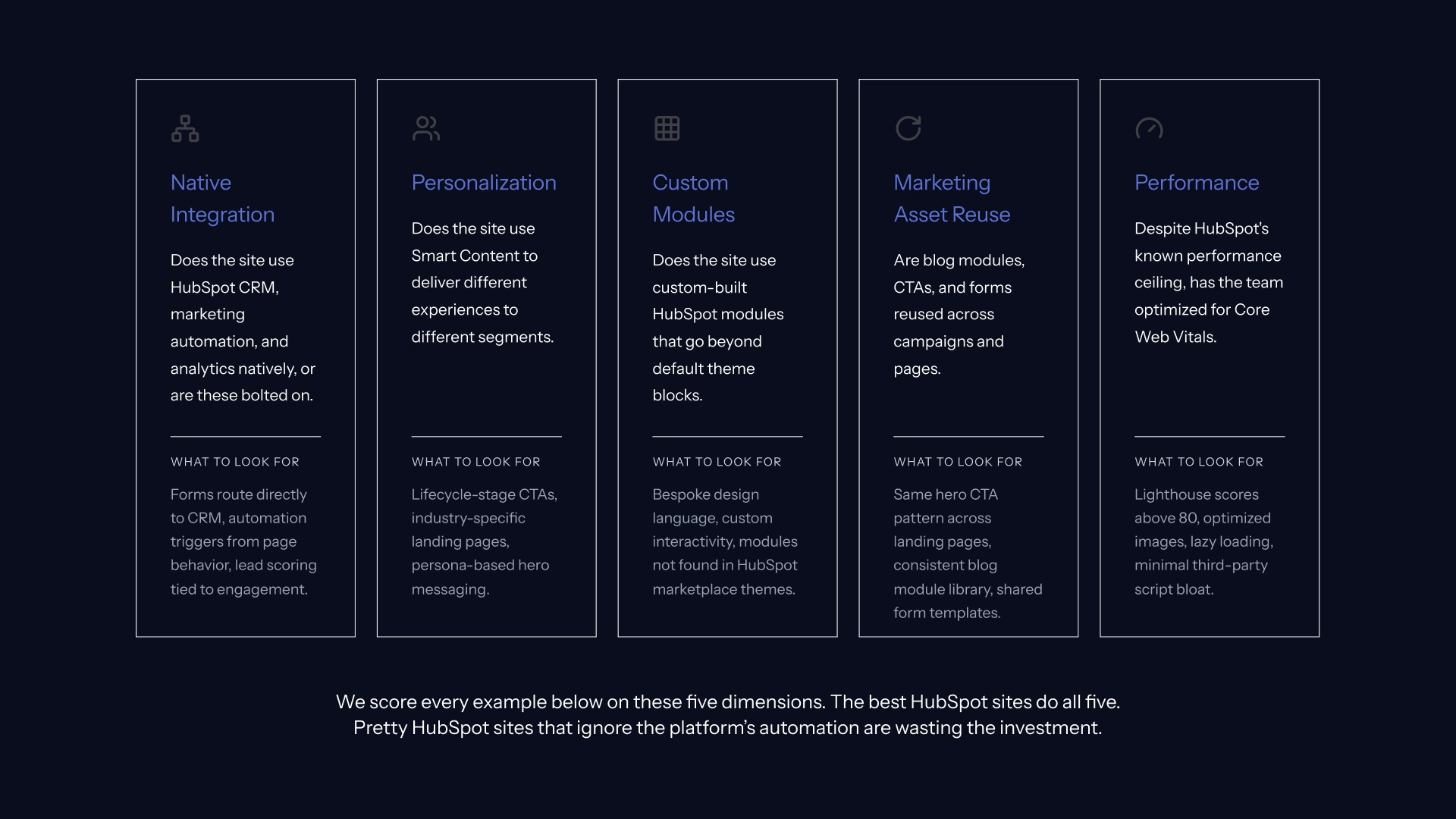
Every site in this guide is ranked on five dimensions.
- Native Integration (1-5). Does the site use HubSpot CRM, marketing automation, and analytics natively? Or are those capabilities bolted on with third-party connectors and workarounds? A high score means forms route directly into Sales Hub, page behavior triggers lead scoring workflows, and analytics live inside HubSpot.
- Personalization (1-5). Does the site use Smart Content to deliver different experiences to different visitors based on lifecycle stage, list membership, industry, device, or contact properties in HubSpot CRM? This is HubSpot's strongest differentiator. A high score means the site uses it deliberately and at meaningful depth.
- Custom Modules (1-5). Does the site go beyond default theme blocks? Custom-built HubSpot modules signal intentional design investment and a mature build. Sites that rely entirely on theme defaults usually have limited scalability and visible sameness.
- Marketing Asset Reuse (1-5). Are blog modules, CTAs, forms, and campaign content reused across pages and campaigns in a repeatable way? This dimension reflects HubSpot operational maturity. The difference between a site that required full engineering involvement to launch every campaign and one where the marketing team ships independently.
- Performance (1-5). HubSpot has a known performance ceiling. A high performance score here means the team optimized intentionally for Core Web Vitals within those constraints, not that the platform erased them. This limitation frequently prompts larger brands to evaluate Webflow SEO services as a high-performance alternative.
How We Organized This Guide: By HubSpot CMS Capability
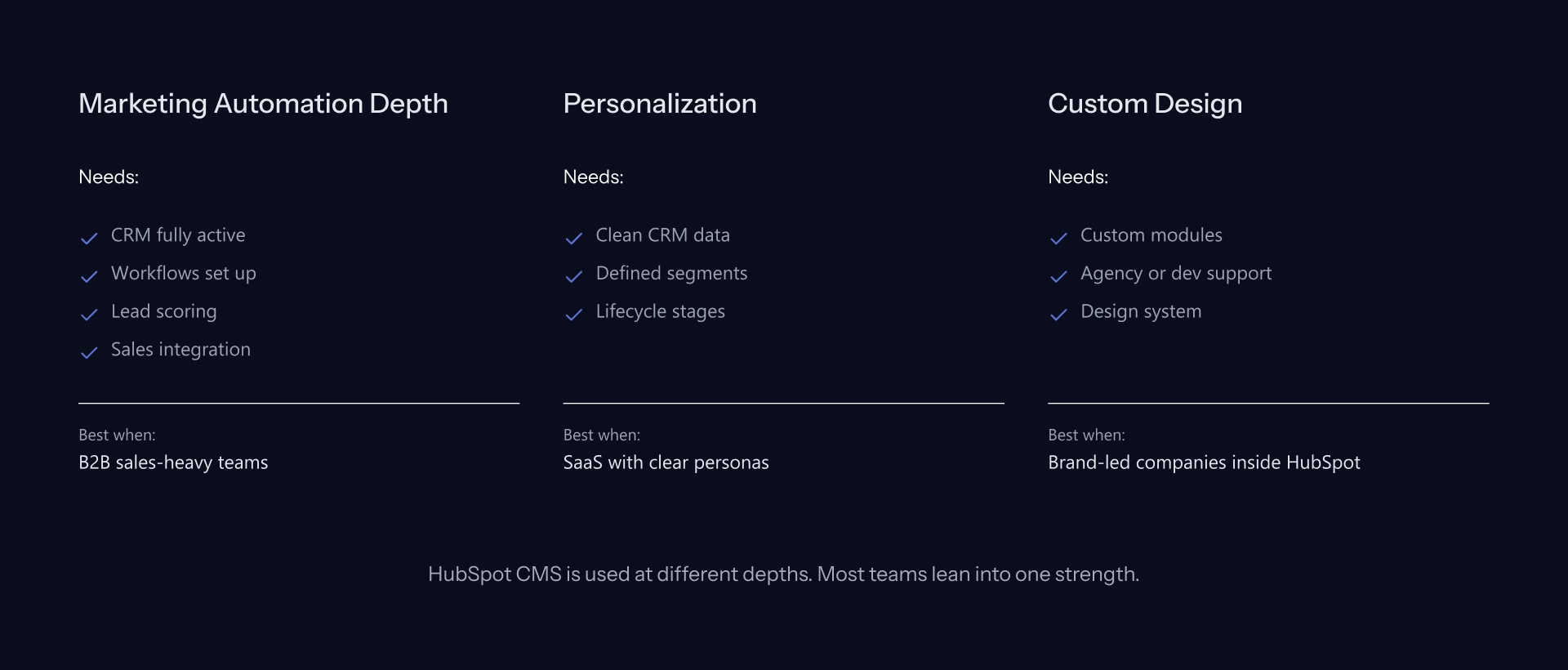
HubSpot CMS is not one product. It is several capabilities available at different depths depending on Hub tier, marketing operations maturity, and what your team actually builds with.
A site that excels at marketing automation passthrough often has minimal custom design investment. A site with strong custom module development often does not exploit HubSpot's personalization. We organize by capability so you can find the example that matches your actual priority, not the one that photographs best.
One important note: every site in this guide should be verified against builtwith.com and the HubSpot Inspire gallery before using in a presentation. HubSpot adoption changes. Sites migrate. When platform verification matters for your evaluation, check directly.
Best HubSpot Sites That Use Marketing Automation as the Architectural Center
Every site in this section shares one trait: the marketing pages do automation work, not just display work; their marketing page (or landing page) isn't just for show. It has an automated function within it.
Forms route into HubSpot CRM. Page behavior triggers lead-score updates. Content downloads launch nurture workflows. Sales gets a real-time alert when a lead crosses a scoring threshold.
What Native HubSpot Integration Unlocks
Design varies across these sites. The automation pattern doesn't. This isn’t the case here. For B2B teams already invested in HubSpot marketing automation and CRM, this represents the most valuable HubSpot CMS pattern.
When the site and the CRM work together as a single entity, the value of the platform can compound.
Trello (Atlassian Marketing Pages): Marketing Automation at Scale
Atlassian's approach to marketing pages is instructive precisely because of its discipline. Conversion paths are product-led. Every form and trial entry point routes directly into HubSpot CRM and downstream automation sequences. The design stays deliberately simple. That is not a limitation; it is a choice that makes the automation system the hero.
What to copy: The discipline of routing every conversion path through a single CRM and automation system. One system. One source of record.
Honest limitation: This level of build reflects Atlassian's internal engineering depth. Most mid-market B2B teams will use a fraction of what is built here. The pattern is transferable. The scale is not directly replicable without significant marketing operations investment.
Loopio: HubSpot CRM + CMS + Sales Integration
Loopio is an RFP response platform for B2B sales teams. The site uses industry segmentation via Smart Content (different industries see different case studies), CTAs tied to HubSpot lead scoring milestones, and webinar registration paths integrated end-to-end with Marketing Hub.
What makes Loopio a useful reference is that the implementation is not hiding behind complex product design. The structure is visible. The patterns are legible. A marketing team evaluating HubSpot for a similar use case can see exactly how the pieces connect.
What to copy: The industry-segmentation Smart Content pattern. This is one of HubSpot CMS's highest-ROI features and one of the most consistently underused.
Honest limitation: Page load times on resource-heavy pages exceed Webflow benchmarks for comparable sites. Maintaining multi-axis Smart Content variants also requires a marketing operations function. Most mid-market teams underestimate that ongoing investment.
Pipefy: Workflow Automation Meets Content Strategy
Pipefy is a workflow management platform. Its website reflects a specific HubSpot CMS capability most agencies do not highlight: HubDB-driven solution pages. Rather than requiring engineering involvement to publish each new use case, Pipefy's marketing team uses HubSpot's built-in database system to generate solution pages dynamically.
For B2B teams with multiple verticals, industries, or use cases, this pattern is worth studying carefully. It is one of HubSpot CMS's genuine structural advantages over Webflow for content-at-scale scenarios.
What to copy: The HubDB pattern for dynamically generated solution pages. If your team publishes content across industries or use cases, this pattern removes engineering from the publishing loop.
Honest limitation: HubDB-driven pages carry SEO trade-offs that require active monitoring. HubDB also requires HubSpot CMS Pro at minimum. Verify current pricing at hubspot.com/products/cms/pricing before scoping a build around this capability.
Best HubSpot Sites That Use Smart Content and Personalization as the Architectural Center
HubSpot CMS's personalization system is called Smart Content. Pages can deliver different copy, different CTAs, different section layouts, and different imagery to different visitors based on a wide range of CRM signals: lifecycle stage, list membership, industry, device, country, referral source, or custom contact properties.
Why Smart Content Matters for B2B
This is HubSpot's strongest differentiator against Webflow in a direct capability comparison. Webflow can implement personalization through third-party tools like Mutiny or custom JavaScript, but HubSpot has it native, integrated with the CRM, with no additional vendor.
For B2B teams running account-based marketing strategies, Smart Content alone often justifies the platform choice.
Vidyard: Persona and Industry Smart Content
Vidyard is a video platform for B2B sales and marketing. The site uses Smart Content on multiple axes simultaneously: industry-specific landing pages, persona-based hero messaging (sales vs. marketing vs. customer success), and lifecycle-stage CTAs that change based on CRM data.
The layered approach is the key insight. Most teams start Smart Content and stop at one dimension. Vidyard shows what multi-axis implementation looks like when the marketing operations function matures into it.
What to copy: Start with persona-based Smart Content in two to three variants before scaling to multi-axis. The Vidyard approach is aspirational. The starting point is much simpler.
Honest limitation: Testing and maintaining multi-axis Smart Content variants requires content team capacity that most teams consistently underestimate. Build the operational plan before the variant count.
ChargeBee: Lifecycle-Stage Smart Content for SaaS
ChargeBee is a subscription billing platform. Its Smart Content implementation centers on a single but powerful dimension: HubSpot CRM lifecycle stage.
Prospects, evaluators, and existing customers see different homepages, different pricing page framing, and different CTAs, all served from the same URLs without redirects or separate page builds.
What to copy: The lifecycle-stage Smart Content pattern is the right starting point for SaaS teams. It requires fewer variants than persona-based approaches and delivers a clear conversion lift when implemented cleanly.
Honest limitation: This implementation depends entirely on clean CRM data. If your HubSpot CRM lifecycle stages are inconsistently populated, Smart Content serves the wrong experience to the wrong people. CRM hygiene is the prerequisite, not the afterthought.
Sungard AS: Industry-Specific Personalization at Enterprise Scale
Sungard AS provides IT infrastructure and disaster recovery for enterprise clients. Its HubSpot implementation shows industry-specific microsites built from a shared master template:
healthcare, financial services, and manufacturing audiences each see relevant case studies, compliance language, and industry-specific social proof, all managed through HubSpot CMS without rebuilding the design system for each vertical.
What to copy: The industry-microsite-from-shared-template pattern. For enterprise B2B teams serving distinct regulated verticals, this approach eliminates the choice between consistency and relevance.
Honest limitation: Enterprise B2B sites at this scale push HubSpot's performance ceiling. Lighthouse scores trail Webflow benchmarks for comparable enterprise builds. This is HubSpot's known architectural constraint at scale, not a reflection of implementation quality.
Best HubSpot Sites That Push the Platform's Design Boundaries
HubSpot CMS has design constraints. The module system is flexible, but it is not as open as raw HTML and CSS, and it is not Webflow's Designer. Sites that achieve visual sophistication comparable to a Webflow build are doing significant custom development work.
Working Within HubSpot's Design Constraints
Custom design in HubSpot often costs more than equivalent design work in Webflow, because the module system adds a layer of abstraction that requires additional engineering.
That trade-off is worth it when native HubSpot integration and personalization capabilities are the priority. It is a harder argument when design is the primary goal and HubSpot CRM is not deeply in play.
HubSpot.com: The Reference Implementation
HubSpot runs on HubSpot CMS. As the platform's own marketing site, it represents what the system can do at the upper limit. Custom modules throughout, sophisticated motion design, integrated product demonstrations, and deep personalization for HubSpot's own segmentation model.
What to copy: Nothing literally. Use HubSpot.com as the upper bound of what HubSpot CMS can technically deliver, not as a scoping benchmark for your project.
Honest limitation: HubSpot.com is built by HubSpot's internal engineering team with internal tooling. The gap between this and what an agency or in-house team can produce is substantial. Treating it as a design reference for a client scoping exercise sets expectations a real engagement will struggle to meet.
Owner.com: Custom Design for SMB Vertical SaaS
Owner.com is a marketing platform for restaurant businesses. The site demonstrates that strong custom design is achievable within HubSpot CMS when the module library is built from scratch rather than extended from theme defaults.
Bespoke modules, motion design, video-led hero sections, and clear vertical-SaaS positioning combine into a site that reads as genuinely considered, not assembled from a template.
What to copy: The discipline of building a custom module library the marketing team can compose from. This is the investment that separates scalable HubSpot builds from fragile ones.
Honest limitation: Reaching this level of custom design typically requires a HubSpot Gold or Diamond Partner engagement. It is not a DIY build and should not be scoped as one.
Eaton: HubSpot at Industrial Enterprise Scale
Eaton provides power management products and services at industrial enterprise scale. Its HubSpot presence is notable for one reason: most HubSpot design examples are SaaS-only.
Seeing HubSpot deployed in a complex, multi-product, multi-audience industrial B2B environment shows the platform's range.
What to copy: The slice-of-the-stack approach. HubSpot does not have to be everything. For large organizations, it can be the marketing automation layer for a specific segment while other systems handle other functions.
Honest limitation: Large enterprise sites consistently push against HubSpot's performance ceiling. This is expected at scale, but worth naming before anyone treats a Lighthouse score from an enterprise HubSpot deployment as a typical benchmark.
When HubSpot Is the Wrong Choice and the HubSpot vs. Webflow Decision Framework
In our research for this article, we identified two patterns behind sites that previously ran on HubSpot CMS and migrated away. Both are worth naming clearly.
Sites We Reviewed That Outgrew HubSpot (and Why)
Pattern 1: Scale-driven migration. Sites that grew past 500 to 1,000 pages found HubSpot's pricing curve and performance ceiling increasingly difficult to justify. At smaller page counts, HubSpot's per-contact pricing model is competitive. At scale, the math changes. Combined with performance gaps that become more visible at higher traffic volumes, some teams decide to migrate before the cost of staying exceeds the cost of moving.
Pattern 2: Design-driven migration. Teams that prioritized brand as a competitive strategy found HubSpot's module system constraining over time. The investment required to push HubSpot to Webflow-level design sophistication often exceeded the cost of rebuilding in Webflow entirely. When design freedom becomes a strategic priority rather than a nice-to-have, the calculus shifts.
These migrations are not failures of HubSpot. They are signals that HubSpot was the right choice for an earlier stage, and that the business may now need to migrate to Webflow or adopt different approach.
The HubSpot vs. Webflow Decision Framework Belt Uses With Real Clients
This is the framework Belt Creative uses when a client is choosing between platforms. Five questions. Work through them in order.
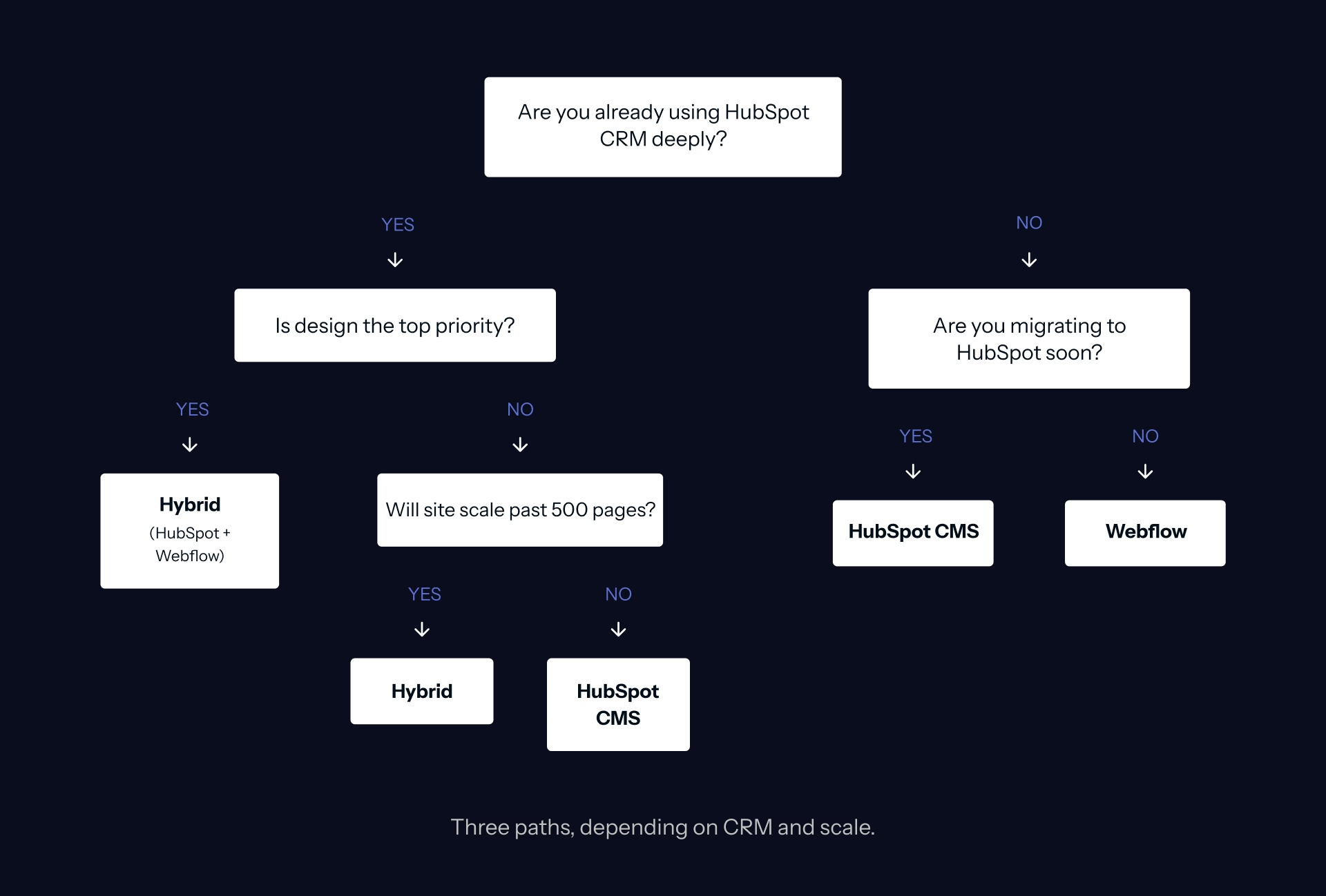
- Are you already running HubSpot CRM at depth? Lead scoring, automation sequences, sales integration, and contact lifecycle management in regular use. If yes, HubSpot CMS reduces friction significantly. If no, the case for HubSpot CMS weakens. Webflow with third-party form and automation integrations often serves better.
- What is your page count now and in three years? Under 200 pages, either platform works. Over 500 pages and growing, Webflow Enterprise scales more gracefully and predictably. HubSpot's pricing structure and performance characteristics at scale favor content-stable sites over high content velocity.
- Is design sophistication a strategic priority for your brand? If you compete on brand, not just product, Webflow gives more design freedom meaningfully. HubSpot CMS is sufficient for strong design, but it operates within constraints that Webflow does not have.
- Does your team have marketing operations capacity to maintain Smart Content variants? If yes, HubSpot's native personalization is genuinely hard to match. If no, simpler segmentation through Webflow and Mutiny often serves better than Smart Content that gets implemented and then unmaintained.
- What does your 3-year budget model look like for the platform? HubSpot pricing scales with marketing contacts and CMS tier. Webflow pricing is more predictable and does not carry the contact-volume variable. For teams forecasting significant database growth, run the 3-year number on both platforms before committing. This is one reason enterprise teams increasingly evaluate why Webflow Enterprise may fit long-term growth models more cleanly.
The HubSpot + Webflow Hybrid: When You Want Both
The architecture pattern most sophisticated B2B teams eventually converge on is not HubSpot or Webflow alone. It is a HubSpot and Webflow integration built together as a unified stack.
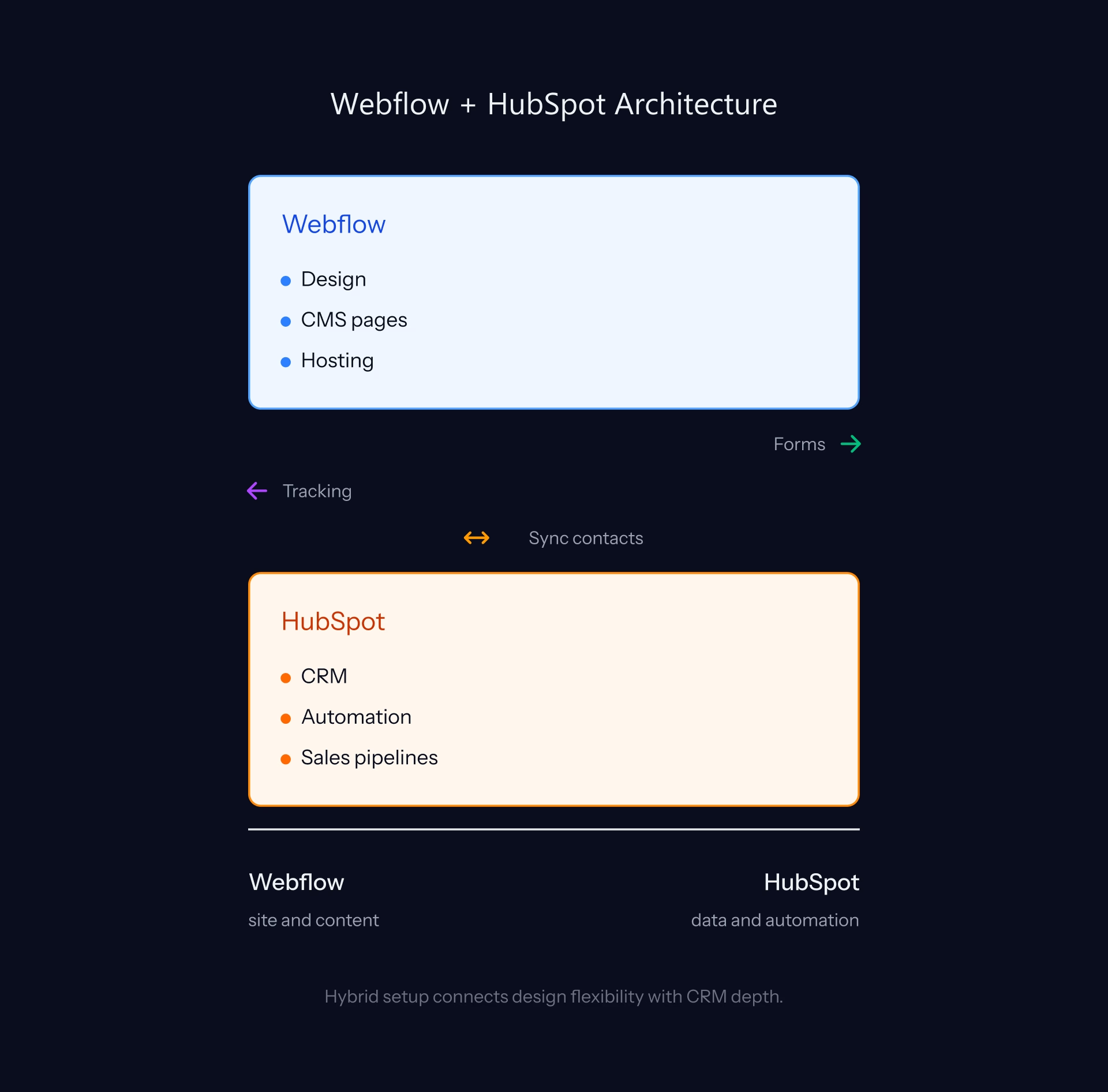
HubSpot CRM and Marketing Hub handle the operations layer: lead scoring, automation workflows, sales sequences, contact management, and lifecycle reporting. Webflow handles the marketing website: design freedom, performance, scalability, and brand expression.
The integration is straightforward. Forms on the Webflow site post directly into HubSpot via the HubSpot Forms API. The HubSpot tracking code embeds in Webflow to capture page views and contact activity. Smart Content personalization equivalents are implemented through Mutiny or custom JavaScript.
The result: Webflow's design and performance with HubSpot's automation depth, without the trade-offs of running the entire stack on either platform alone. Belt Creative holds both HubSpot Gold and Webflow Premium partner status, which is rare across B2B agencies. We build both halves of this stack to the same standard.
Choosing Between HubSpot, Webflow, and the Hybrid
Most B2B marketing leaders evaluating HubSpot are at one of three decision points.
Where to Start (and the Migration Question)
New build. Choose HubSpot CMS if you are committed to the HubSpot ecosystem and marketing automation depth is your primary priority. Choose Webflow if design sophistication or performance is the driver, or if you are not already running HubSpot CRM.
Migrating to HubSpot from WordPress or a similar platform. HubSpot is usually the right call if you are consolidating onto the HubSpot stack. The native integration eliminates friction that plugin-dependent WordPress setups create.
Considering migrating away from HubSpot. This is the conversation Belt has most often. The trigger is usually scale, design needs that have outgrown the module system, or pricing that no longer fits the model. We can have that conversation honestly because we sell both platforms.
Frequently Asked Questions
What makes a good HubSpot website in 2026?
A good HubSpot website uses the platform's native capabilities, not just its design templates. Score on five dimensions: Native Integration with HubSpot CRM and automation, Personalization via Smart Content, Custom Modules beyond theme defaults, Marketing Asset Reuse across campaigns, and Performance within HubSpot's constraints. The best HubSpot sites do all five. Polished HubSpot sites that ignore the platform's automation depth are investing in the wrong dimension.
Is HubSpot CMS better than WordPress?
For B2B teams running HubSpot CRM, HubSpot CMS reduces operational friction significantly. WordPress requires a stack of plugins to approximate what HubSpot CMS does natively. For teams not committed to the HubSpot CRM ecosystem, the case weakens. WordPress remains more appropriate for content-heavy sites, large editorial teams, high page volumes, and budget-constrained environments.
Is HubSpot CMS better than Webflow?
Different, not better or worse. HubSpot is stronger for teams running HubSpot CRM that want native automation, lead scoring, and Smart Content personalization. Webflow is stronger for design sophistication, performance, large sites above 500 pages, and teams not committed to the HubSpot ecosystem. The most sophisticated B2B teams often run a hybrid: HubSpot for CRM and automation, Webflow for the marketing site, connected via API.
What is HubSpot Smart Content?
Smart Content is HubSpot's native personalization system. Pages can show different content (text, images, CTAs, entire sections) to different visitors based on lifecycle stage in HubSpot CRM, list membership, country, device, referral source, or any contact property. It is HubSpot CMS's strongest differentiator against Webflow. Implementing it well requires marketing operations discipline that most mid-market teams underestimate upfront.
How much does a HubSpot website cost?
HubSpot CMS Hub Starter starts around $25/month, Pro around $400/month, and Enterprise around $1,200/month. Verify current pricing at hubspot.com/products/cms/pricing before scoping. Custom design and development for a mid-market B2B site typically runs $20,000 to $80,000. Enterprise engagements run $80,000 to $200,000 and above. The cost factor most buyers miss: HubSpot pricing scales with marketing contact volume, not just CMS tier. Run the 3-year contact growth math before committing.
Can you migrate a website from HubSpot to Webflow?
Yes. The process involves rebuilding the site in Webflow Designer, migrating CMS-based content (blog, resources) into Webflow CMS, integrating HubSpot CRM via the Forms API and tracking code, and replacing Smart Content with Webflow and Mutiny or custom segmentation. Belt Creative handles this migration regularly. Typical timeline is 8 to 16 weeks depending on site size and content volume.
When should I choose HubSpot over Webflow?
Choose HubSpot when: you are already running HubSpot CRM at depth, marketing automation and Smart Content personalization are your primary priorities, your site is under 200 to 500 pages, your team has marketing operations capacity to use the platform's features, and consolidating your vendor stack matters more than best-in-class design tooling. If two or more of those conditions are not true, evaluate Webflow seriously.
What are the limitations of HubSpot CMS?
Real limitations: design constraints within the module system (less open than raw HTML and CSS or Webflow's Designer), performance ceilings on heavy content sites (Lighthouse scores trail Webflow benchmarks for comparable builds), scaling complexity above 500 to 1,000 pages, pricing curves that become punitive at enterprise scale, and theme dependencies that make custom design more expensive than equivalent Webflow work. Every HubSpot-only partner has an incentive to minimize these. We name them because we have an alternative we can recommend honestly.
What is the HubSpot + Webflow hybrid architecture?
HubSpot handles CRM, Marketing Hub, sales sequences, and operations. Webflow handles the marketing website. Forms on the Webflow site post into HubSpot via the Forms API. HubSpot tracking code embeds in Webflow for contact activity capture. Smart Content equivalents are implemented via Mutiny or custom segmentation. The result: Webflow's design freedom and performance with HubSpot's automation depth, without the trade-offs of running everything on one platform.
How do I evaluate whether my HubSpot site is using the platform well?
Audit against the five-point framework: Are you using native HubSpot integrations at depth or just at the surface? Are you using Smart Content for at least persona-level personalization? Do you have custom modules beyond theme defaults? Are blog modules, CTAs, and forms reused across campaigns in a repeatable system? Have you optimized for Core Web Vitals within HubSpot's performance constraints? Most HubSpot sites score two to three out of five. Strong implementations score four to five. That gap is where growth is hiding.
Ready to build the right stack for your brand?
Belt Creative builds on both HubSpot and Webflow at the same level of strategic depth. If you are evaluating platforms, planning a migration, or building a hybrid architecture, we can have that conversation without an agenda toward either platform.
Visit our work to see how we build across both platforms.
.jpeg)

.avif)
